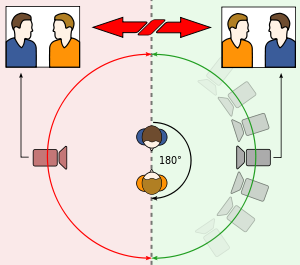
The 180 degree rule is what is used for a shot reverse shot. It means that you can only keep the camera on one side of the people in the conversation, the cameraman can't move on to the other side of the two people involved.
Also, a match on action shot is when you show somebody holding something and the camera will then cut to a close up of the item they are holding.
An eye line match shot is when two people are in different locations and are facing the same directions whilst the camera keeps transitioning from shot to shot. It is used to make two people look like they are talking to one another.
In our short video, we used the match on action in two instances. The first time we used it was when we gave David's character a phone. At first, a long shot was used to show him being given the phone, and as he took it from her, the camera transitioned to a close up of him holding it. From this point on, every time the phone was shown it was used in a close up of it.
 The second time we used a match on match action was when my character had to detonate the bomb. We first showed me holding it from a medium shot and then after I laughed, it moved to a close up of the detonator. Both of these shots are used to emphasise the danger and add some intensity.
 We used an eye line match shot when the two actors were on the phone to each other and we used it to make it look like they were talking directly to each other. David's character was facing left as my character was facing right, both off screen.
Around the school, the filming process was easy as the locations were very easily accessible. The noise in the background of the shots were a bad thing as they took away from the situation in the film, however we fixed this by muting the sound and putting music in the background. One example of this was when we used the close up on the phone timer, there was a lot of noise surrounding the microphone, luckily we didn't need to keep the sound from this clip and we could mute it. Also, we were able to use an extreme long shot whilst David ran into the building, this shot was easily done as nobody was around to interrupt us although the wind did make noises on the microphone.
 We also used a close up on David's feet as he ran which added intensity to the situation, this was another example of match on action.
When my character picked up the phone, we used a tilt to make it look a bit more mysterious as we don't know who the character actually is and people will want to know.
Editing the video was quite interesting as we were quite new to the software. One thing that we figured out how to do was how to lock audio and video tracks. This became useful when trying to mute audio or try to make sure certain videos didn't get in the way. Another thing we discovered was how to use the green screen in order to make our explosion, which was really useful as it looked somewhat realistic. Something we didn't know how to do at first was how to cut audio and video tracks lucking we figured it out and found out we had to click a certain button to change the way the mouse works.

No comments:
Post a Comment